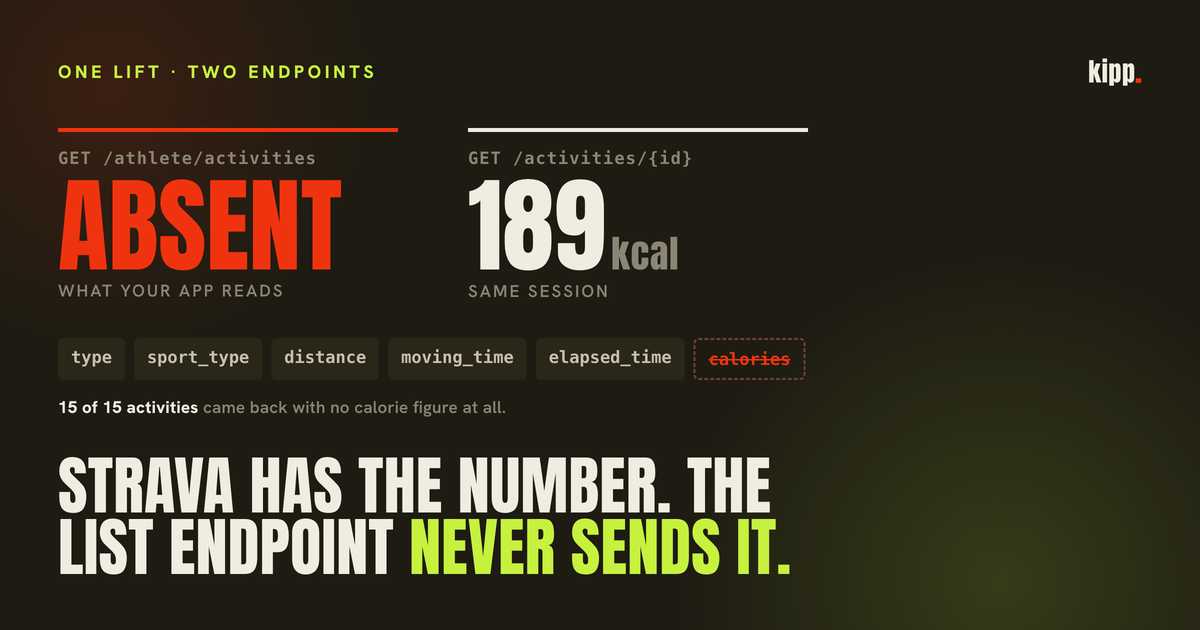
One athlete connected Strava to check a suspicion. Fifteen activities came across. Every one of them arrived with no calorie figure at all, including a lifting session whose Strava activity page reads 189 kcal.
The number was right there. It was on the website. It was in Strava's database. And the endpoint every connected app uses to read your training simply did not include it.
That turned out to be one of two unrelated reasons a Strava calorie figure goes missing, and most of the advice online conflates them. They have different causes, different fixes, and only one of them is anything you can do something about.
The short answer
Strava calculates calories for four sports only: ride, run, walk and hike. Everything else shows a burn only if the device that recorded it wrote one into the file. Separately, and for all sports including those four, Strava's API omits the calorie field from the endpoint apps use to list your activities, so a connected app that does not fetch each activity individually will see nothing for any of them.
The first zero: Strava does the arithmetic for four sports
Strava's own help centre is unusually direct about this. It performs calorie calculations on "ride, run, walk, and hike activities", and "all other activity types will not display calories unless the upload partner includes the data with the activity upload".
That is the entire explanation for the most common complaint. Your weight training session, your rowing erg, your yoga class and your martial arts session are not being calculated incorrectly. They are not being calculated.
The four it does compute do not all use the same method, and it is worth knowing which one you are looking at:
| Sport | How Strava gets the number |
|---|---|
| Ride | Power output times a coefficient for human efficiency, with power either measured or estimated from your weight |
| Run | Grade-adjusted speed, weight and moving time, times a scaling factor |
| Walk, Hike | Calculated, same family of inputs |
| Everything else | Whatever the recording device wrote into the file, or nothing |
There is a consequence of that last row that catches people out. When the figure came from your watch rather than from Strava, Strava treats it as a fact it has been handed rather than something it owns. Its help centre notes that for third-party calorie data, changes to your Strava weight and activity elevation "will have no effect on Caloric total". Correct your weight in your profile and every ride recalculates. Your lifts do not move, because Strava never computed them in the first place.
So if a gym session shows calories, thank your watch. If it shows nothing, your watch did not send any, and no setting inside Strava will conjure one.
One wrinkle worth flagging rather than glossing: Strava's newer in-app strength training feature, where you log sets and reps in the Strava app itself, does display calories burned on the activity page. That is consistent with the rule above rather than an exception to it, since a session recorded in Strava's own app is not an upload from a partner, but we have not tested that path ourselves and are reading the two help pages together rather than measuring.
The second zero: the number exists, and the list endpoint withholds it
This is the one nobody tells you about, and it affects every sport, including the four Strava does calculate.
Strava's API represents an activity two ways. SummaryActivity is what you get back from the list endpoint, GET /athlete/activities, which is how essentially every connected app reads your training history in bulk. DetailedActivity is what you get from GET /activities/{id}, one activity at a time.
SummaryActivity has no calories field. DetailedActivity does.
This is deliberate. Strava's stated reasoning in developer discussions is that keeping less important stats out keeps the summary object small, which is a defensible engineering position and a miserable one to be on the receiving end of, because the alternative is fetching every activity individually.
We measured what that means on a real connected account. All 15 activities returned from the list endpoint had the calorie field absent. Not zero, not null: absent. The detailed endpoint, called for one of those same sessions, returned 189 kcal.
Two different objects describing the same lift, one of them incomplete, and the incomplete one is the default.
Sample size here is one account, so treat the 15 of 15 as an illustration of the mechanism rather than a rate. The mechanism itself is not a sample, it is documented API behaviour.
Kilojoules are on the summary, and they are not calories
There is one energy figure that does survive into the summary object, and it is a trap if you do not know its scope.
kilojoules is documented as "the total work done in kilojoules during this activity. Rides only". Not calories, and not available for anything but cycling.
For rides specifically, using it as a calorie proxy is defensible, and the reason is a genuine coincidence of physics. One kilocalorie is 4.184 kilojoules. Human gross metabolic efficiency on a bike is roughly 20 to 25 percent, so producing one kilojoule of mechanical work costs you about four kilojoules of metabolic energy. Divide by the efficiency, convert the units, and the two factors very nearly cancel. A 900 kJ ride costs you somewhere around 900 kcal.
That is why our own integration maps a ride's kilojoules straight onto its calorie figure, rounded, with no conversion. It is accurate enough for cycling and it is honest about being an approximation.
It is also useless for everything else, and there is a second-order catch even within cycling. The summary object carries a device_watts flag, described as "whether the watts are from a power meter, false if estimated". A ride recorded without a power meter still gets kilojoules, derived from Strava's estimate of your power from speed, weight and gradient. The field is named "total work done" either way. Whether that work was measured or inferred is a different field entirely, and an app that reads one without the other is presenting an estimate as a measurement.
Why apps do not fetch every activity individually
The obvious fix is for your connected app to call the detailed endpoint once per activity. Most do not, and the reason is a budget you cannot see.
Strava's rate limits are per application, not per user. The default allowance is 100 read requests every 15 minutes and 1,000 per day, shared across every athlete who has ever connected that app.
Work through what a naive backfill costs. Thirty days of history for one moderately active athlete is around 20 activities, so 20 detailed calls. Fifty such athletes syncing on the same morning is 1,000 calls, and the app is finished for the day, for everybody, before lunch. Strava's higher access tier raises the read limit to 200 per 15 minutes and 2,000 per day, and its documented support level is up to 10 connected athletes.
That is the real constraint behind a missing number, and it is not one an individual user can do anything about.
What we did, and the part that was worse than the missing number
Our fix was to fetch the detailed activity, but only for sessions where nothing else already measured the burn.
The gate exists for two reasons and the second one matters more than the budget. If a session was recorded by both a watch and Strava, filling in a calorie figure from Strava produces a second measured record of the same workout with a different number on it. Deduplication cannot always collapse those, and the result is a double-counted session. So we only spend a call where the alternative is leaving a rough estimate in place, and we deliberately bias the check toward assuming coverage: a skipped fetch leaves an honest estimate, a wrong fetch corrupts a total.
Running that against the same athlete's real history: one detailed API call across 17 sessions. Every wearable-covered day was skipped. His estimated activity count went from 4 of 20 to 0, three of those closed by a separate deduplication fix and the last one by this fetch.
Now the part we found uncomfortable.
Our own pipeline had a filter that skipped any Strava activity arriving without a calorie figure. Reasonable in isolation, since an activity with no burn contributes nothing to a calorie total. But recall which sports carry kilojoules: rides only. So a runner whose training lives entirely on Strava produced activities with no kilojoules, no calories from the summary endpoint, and therefore no rows at all.
Which meant the coaching layer read zero sessions for someone running four times a week, and graded their training habits against that zero.
A cosmetic gap in a calorie display had quietly turned into a false accusation about whether somebody trained. That is a much worse failure than a blank number, and it was invisible, because nobody reports a bug that says their app thinks they are doing less than they are. They just conclude the app does not work and stop opening it.
The general rule we took from it: a zero from a connected source is suspect until proven. An activity with no measured burn is a real session with an unknown cost, and those two things need to stay distinguishable all the way down the stack. Our activity breakdown now reports how many sessions had no measured burn as a separate figure, rather than letting them silently become zeroes inside a total.
What to do
- Work out which zero you have. If it is a lift, a row, a swim or a class, Strava never calculated it. If it is a run or a ride showing on Strava but missing in a connected app, the number exists and the app is not asking for it.
- Record gym sessions on a device that writes calories. A watch with a heart rate sensor syncing to Strava will populate the field. Entering the session by hand in most tools will not.
- Fix your weight in Strava if you care about rides and runs. It is a direct input to both calculations. It changes nothing at all for activities whose calories came from a device.
- Check
device_wattsbefore trusting a ride's energy figure. Estimated power and measured power are both reported as work done, and only one of them is. - Treat a zero-session week from a connected source as a bug report, not a rest week. Especially if you know you trained. Filters that drop unmeasured activities are common and their failure looks exactly like inactivity. There is a second, entirely separate cause of the same empty result: the permission your app was granted may not let it see private activities at all.
- Do not chase precision that is not there. Strava's own accuracy ladder puts power-based estimates within roughly 5 percent, heart rate at 10 to 20, and time-and-weight formulas anywhere from 20 to 60. A calorie figure on a lifting session is the last of those three at best.
The number on the screen and the number an app can read are not the same number, and neither of them is a measurement in the way the interface implies.
Kipp reads your training from Apple Health, Garmin, Strava, Whoop and Oura, and reconciles what they disagree about before coaching off it. When a session has no measured burn, it says so rather than treating it as zero.
Sources
- Calorie Calculation, Strava Help Center - which activity types Strava calculates, and the upload-partner rule
- Strength Training, Strava Help Center - metrics shown on a strength activity
- Strava API v3 reference -
SummaryActivityandDetailedActivityobject definitions - stravalib SummaryActivity documentation - the summary field list,
kilojoules"rides only",device_watts - Rate Limits, Strava developers - per-application limits and higher-tier allowances
- Can not get calories param from Strava API Response - developer discussion of the summary object omission
- kJ to Calories Conversion, TrainerRoad - gross metabolic efficiency and the kJ/kcal approximation
- Energy Expenditure: Calories, Kilojoules, and Power in Cycling, CTS - efficiency range and accuracy comparison