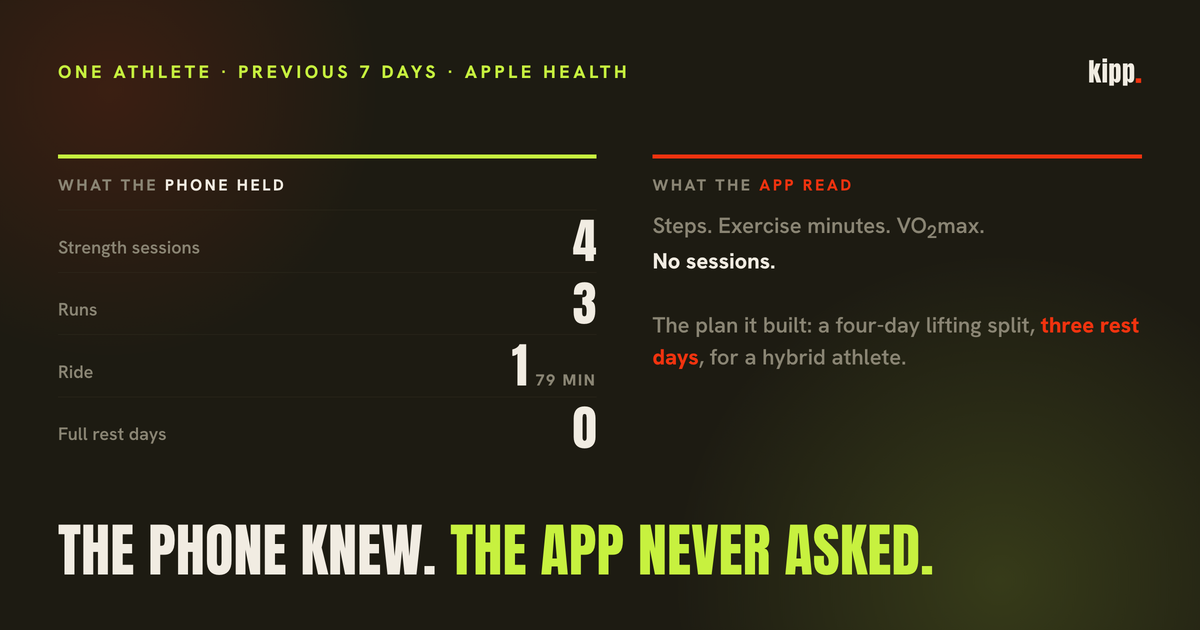
On 29 August a new athlete connected Apple Health during onboarding and typed, when the coach asked about his training, "Check yourself you see the workouts." The reply was that Apple Health "doesn't break down workout types for me, just total minutes and steps". The plan that followed was a four-day pure lifting split with three rest days.
His phone, at that moment, held a workout list for the previous seven days: four strength sessions, three runs and a 79-minute ride, with a VO2max of 60.9 and no full rest day among them. The next morning he wrote "Your plan is complete nonsense", hit the paywall mid-complaint, and came back a week later to hit it four more times. He was right, and the coach's statement about Apple Health had been true only about what we had asked it.
The short answer
Apple Health stores every workout with one of more than eighty named activity types, so it knows whether you lifted, ran, rode or walked. An app that reports it can only see "steps and minutes" has queried the daily totals and not the workouts. Two further reads turn the list into a wrong plan even when it is fetched: counting walks as sessions, when walks are half of a phone-only athlete's rows, and dividing session counts by the window you asked for instead of the days the phone actually observed. We made all three mistakes in one onboarding.
What HealthKit stores about a workout
An HKWorkout carries an HKWorkoutActivityType, and Apple's documentation lists more than eighty of them. Three matter for this story. traditionalStrengthTraining is "strength training exercises primarily using machines or free weights". functionalStrengthTraining is "strength training, primarily with free weights and body weight". mixedCardio is "workouts that mix a variety of cardio exercise machines or modalities". And other is "a workout that does not match any of the other workout activity types", the bucket an app has to reckon with.
The Apple Watch's Workout app writes these types when you pick them, and third-party apps writing into Health pick their own. So the question of whether an app can see what you trained has a plain answer: yes, if it queries workouts. Steps, active energy and exercise minutes are separate, cheaper reads, and an app that stops at those will honestly tell you it cannot see your sessions.
Here is what the type field looked like across every Apple Health workout our app has stored, 304 rows from 18 athletes.
| Apple Health activity type | Rows |
|---|---|
| Walking | 100 |
| Running | 89 |
| TraditionalStrengthTraining | 34 |
| Cycling | 22 |
| FunctionalStrengthTraining | 18 |
| Other | 12 |
| MixedCardio | 9 |
| Pilates | 8 |
| Yoga | 6 |
| HIIT, Dance, TableTennis, CoreTraining | 6 |
Fifty-two strength sessions, correctly typed, in a source we were telling athletes could not distinguish a lift from a run.
The Other row is worth a second look because it is the one people worry about. Nine of the twelve belong to a single athlete whose Garmin also writes into Apple Health, and our earlier piece on workouts appearing twice traced that exact shape: Garmin's strength_training arriving in Health as Other with identical calories. The Watch itself was not the source of the generic label on this roster; a third-party writer was. Small numbers, and one athlete accounts for most of them, so treat it as what we saw rather than a rule about Garmin.
The read we were not doing
During onboarding our app sends the server a summary of what Apple Health holds, so the coach can build a plan from data rather than from one word the athlete typed. That summary carried steps, exercise minutes, active calories, VO2max, sleep and heart-rate baselines and the body basics. It carried no sessions. The workout query existed, but it ran on the coaching screen, which mounts after onboarding ends; this athlete's nine workout rows are stamped one second after his intake finished.
Meanwhile the same server was already receiving a by-sport breakdown from Strava and Garmin connections, and the intake prompt already said to name the athlete's sport mix from the by-sport data. For an Apple Health athlete it was asking for a field that had never been supplied. The coach's "doesn't break down workout types for me" was a faithful description of its inputs.
We measured who that reached. Of 32 onboarded athletes at the time, 16 had a Garmin, Strava or other source that already supplied a mix, 8 had no training source at all, and 8 had Apple Health and nothing else. In 5 of those 8, the sports they had declared in conversation missed something HealthKit was holding. Both prospects who had gone quiet after a shaky plan that fortnight were in that group.
The fix is a summary of the workout list shipped with the rest of the Apple Health block: sessions, sessions per week, days observed, a by-sport breakdown, and walks counted separately. We replayed the athlete's real intake up to the connect turn three times each way. With the block, the coach named the lifting and the running 3 of 3 times ("You're already a hybrid athlete, and a serious one. Four strength sessions, three runs and a ride in the last week") and claimed it could not see types 0 of 3. With his aggregates as they had been stored, it named the mix 0 of 3 and reproduced the original failure 2 of 3. Three samples each, on one athlete. It shows the read works, not that onboarding is solved.
Two more ways the list goes wrong once you have it
Fetching the workouts is the easy half. The reducer that turns 90 days of rows into "what this person trains" has two traps, and both come from the shape of a phone's data rather than from any bug in HealthKit.
Walks are not sessions. For the ten athletes on our roster whose only training source is Apple Health, walks were 84 of 169 workout rows. One had 44 walks beside 8 sessions; another had 11 walks and 1 lift. A phone records a walk whenever the Watch or a walking app decides one happened, and an athlete who commutes on foot produces one a day. Count them as sessions and a lifter reads as a walker, and the plan drawn from that reads back as nonsense. The reducer keeps walks and hikes in their own bucket, reported but never in the session count, which is the same rule our habit grading uses for the commute that got counted as a workout.
The denominator is days observed, not days requested. The athlete above had eight sessions in the window we queried. Divide by the 90 days we asked for and he trains 0.6 times a week, which is a description of someone barely active. Divide by the seven days between his first recorded workout and the day he connected, which is when his data actually starts, and it is eight a week, which is who he is. The reducer runs the rate from the first recorded workout to now, floored at seven days so a single session cannot read as seven a week, and ships the observed-day count alongside so "8 sessions" is visibly over one week and not thirteen. We have written before about the same trap with steps: an average taken over the window you asked for, rather than the days that have data, is how a sparse record gets reported as a low one.
One smaller rule closes a duplicate. Garmin Connect and the Watch can each write the same run into Health; rows that start within the same minute are collapsed to one, keeping the more specific type.
What the list says against what people say
With the summary in place we looked at the ten Apple-Health-only athletes and compared the sports each had told the coach about with the types their phone had recorded, walks excluded.
Three of the ten had a sport on the phone that never made it into their profile: two with cycling sessions who had declared strength and running, and one who had declared strength alone and whose phone held runs and rides. Three others had declared a sport the phone had never seen, a triathlete with only runs recorded, a "strength, running, cycling" athlete whose rows were eleven walks and a lift. The remaining four matched.
Neither disagreement is a lie. An athlete describing their training names what they identify with; a phone records what was started on a wrist. A plan has to be built from both, and it has to say which is which, because a cyclist whose profile says "strength" will be programmed rest on the days he rides.
What to check if your app seems to only see your steps
- Look at the permission sheet. When an app connects to Apple Health, the read list it asks for is shown to you. If "Workouts" is not on it, the app cannot see your sessions, whatever it says about being connected.
- Compare its sport list with the Health app's. Open Health, Browse, Activity, Workouts. If Health shows lifts and rides and the app shows minutes, the app stopped at the totals.
- Check how it treats walks. If your session count looks inflated, count the walks in Health for the same week. An app that cannot tell them apart from training will also grade your habits against them.
- Distrust a weekly rate you have not had weeks for. Two sessions in the four days since you connected is not 0.5 a week. An app that reports it that way is dividing by a window, not by your history.
- Tell it what it got wrong, once. "Your plan is complete nonsense" was fair. It was also the first time the coach had been handed the list.
The phone had the answer the whole time. The app had asked it a smaller question and then, having only steps and minutes to work with, described the athlete it could see.
Kipp now reads your Apple Health workouts by type during onboarding, keeps walks out of your session count, and rates you over the days it has actually observed. The first read of a hybrid athlete names the lifting and the running from the phone's own list, and the plan is built for the athlete the data shows rather than the one word they typed.
Sources
- Apple's workout activity types, with the case descriptions quoted:
traditionalStrengthTraining"strength training exercises primarily using machines or free weights";functionalStrengthTraining"strength training, primarily with free weights and body weight";mixedCardio"workouts that mix a variety of cardio exercise machines or modalities";other"a workout that does not match any of the other workout activity types". Apple Developer Documentation: HKWorkoutActivityType - Where the generic
Otherlabel came from on our roster, a Garmin session mirrored into Apple Health. Two apps are double-logging your workouts to Apple Health - The walk-versus-session rule as it applies to habit grading. Your watch counted your commute as a workout
- The 304-row type census, the ten Apple-Health-only athletes, the declared-versus-recorded comparison, the 32-athlete onboarding count and the three-of-three replay are from our own roster data and logs, August and September 2026. Eighteen athletes with Apple Health workouts and one onboarding; none of it is a population claim.